

前置条件:
- 1.Debian 13
- 2.Mattermost enterprise edition release-11
- 3.traefik 3.6.2
- 4.1vCPU,1G内存vps小主机
- 5. https://docs.mattermost.com/deployment-guide/server/deploy-containers.html
- 6. https://github.com/mattermost/docker
本文档详细指导如何在已部署 Traefik 3.6.2 的服务器上,使用 Docker Compose 部署 Mattermost,并针对 1vCPU/1GB 内存环境做了优化。
内容涵盖官方推荐配置、环境变量、Traefik 集成、数据库与数据卷管理、安全与性能建议,确保部署稳定、安全、快速。

一、部署概览
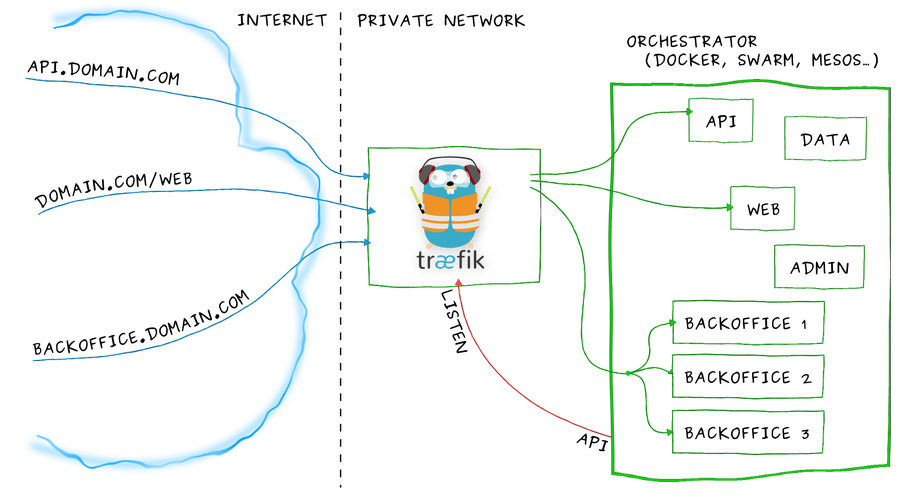
本方案采用官方 Mattermost Docker Compose 配置,结合 Traefik 作为反向代理,适用于资源受限的小型服务器。
核心服务包括:
- Mattermost 应用容器
- PostgreSQL 数据库容器
- 已存在的 Traefik 反向代理(外部网络名为
traefik_network)
二、前置准备
1. 系统与软件要求
- 操作系统:Linux(推荐 Ubuntu 20.04+)
- Docker:20.10+
- Docker Compose:1.28+ 或 Compose V2
- Traefik:3.6.2(已部署,外部网络名为
traefik_network)
2. 目录结构建议
/opt/mattermost-docker/
├── docker-compose.yml
├── .env
└── volumes/
    ├── {config,data,logs,plugins,client-plugins}
    └── db/var/lib/postgresql/data
三、环境变量配置
- 克隆官方仓库并准备环境变量文件:
git clone https://github.com/mattermost/docker.git /opt/mattermost-docker
cd /opt/mattermost-docker
cp env.example .env
2.编辑 .env 文件,重点修改如下:
# Domain of service
DOMAIN=mm.yourdomain.com #修改为你的域名

# Container settings
## Timezone inside the containers. The value needs to be in the form 'Europe/Berlin'.
## A list of these tz database names can be looked up at Wikipedia
## https://en.wikipedia.org/wiki/List_of_tz_database_time_zones
TZ=Asia/Shanghai #修改为你的时区
RESTART_POLICY=unless-stopped

# Postgres settings
## Documentation for this image and available settings can be found on hub.docker.com
## https://hub.docker.com/_/postgres
## Please keep in mind this will create a superuser and it's recommended to use a less privileged
## user to connect to the database.
## A guide on how to change the database user to a nonsuperuser can be found in docs/creation-of-nonsuperuser.md
POSTGRES_IMAGE_TAG=18-alpine #修改为最新或者次新的镜像
POSTGRES_DATA_PATH=./volumes/db/var/lib/postgresql/data #与docker compose保持一致

POSTGRES_USER=mmuser
POSTGRES_PASSWORD=password  #修改为你的密码
POSTGRES_DB=mattermost

# Nginx (本文不使用nginx,所以去掉了)
## The nginx container will use a configuration found at the NGINX_MATTERMOST_CONFIG. The config aims
## to be secure and uses a catch-all server vhost which will work out-of-the-box. For additional settings
## or changes ones can edit it or provide another config. Important note: inside the container, nginx sources
## every config file inside */etc/nginx/conf.d* ending with a *.conf* file extension.

## Inside the container the uid and gid is 101. The folder owner can be set with
## `sudo chown -R 101:101 ./nginx` if needed.
## Note that this repository requires nginx version 1.25.1 or later
#NGINX_IMAGE_TAG=alpine

## The folder containing server blocks and any additional config to nginx.conf
#NGINX_CONFIG_PATH=./nginx/conf.d
#NGINX_DHPARAMS_FILE=./nginx/dhparams4096.pem

#CERT_PATH=./volumes/web/cert/cert.pem
#KEY_PATH=./volumes/web/cert/key-no-password.pem
#GITLAB_PKI_CHAIN_PATH=<path_to_your_gitlab_pki>/pki_chain.pem
#CERT_PATH=./certs/etc/letsencrypt/live/${DOMAIN}/fullchain.pem
#KEY_PATH=./certs/etc/letsencrypt/live/${DOMAIN}/privkey.pem

## Exposed ports to the host. Inside the container 80, 443 and 8443 will be used
#HTTPS_PORT=443
#HTTP_PORT=80
#CALLS_PORT=8443

# Mattermost settings
## Inside the container the uid and gid is 2000. The folder owner can be set with
## `sudo chown -R 2000:2000 ./volumes/app/mattermost`.
MATTERMOST_CONFIG_PATH=./volumes/config
MATTERMOST_DATA_PATH=./volumes/data
MATTERMOST_LOGS_PATH=./volumes/logs
MATTERMOST_PLUGINS_PATH=./volumes/plugins
MATTERMOST_CLIENT_PLUGINS_PATH=./volumes/client/plugins
MATTERMOST_BLEVE_INDEXES_PATH=./volumes/bleve-indexes

## Bleve index (inside the container)
MM_BLEVESETTINGS_INDEXDIR=/mattermost/bleve-indexes

## This will be 'mattermost-enterprise-edition' or 'mattermost-team-edition' based on the version of Mattermost you're installing.
MATTERMOST_IMAGE=mattermost-enterprise-edition
## Update the image tag if you want to upgrade your Mattermost version. You may also upgrade to the latest one. The example is based on the latest Mattermost ESR version.
MATTERMOST_IMAGE_TAG=release-11 #修改为最新版本

## Make Mattermost container readonly. This interferes with the regeneration of root.html inside the container. Only use
## it if you know what you're doing.
## See https://github.com/mattermost/docker/issues/18
MATTERMOST_CONTAINER_READONLY=false

## The app port is only relevant for using Mattermost without the nginx container as reverse proxy. This is not meant
## to be used with the internal HTTP server exposed but rather in case one wants to host several services on one host
## or for using it behind another existing reverse proxy.
APP_PORT=8065
CALLS_PORT=8443
## Configuration settings for Mattermost. Documentation on the variables and the settings itself can be found at
## https://docs.mattermost.com/administration/config-settings.html
## Keep in mind that variables set here will take precedence over the same setting in config.json. This includes
## the system console as well and settings set with env variables will be greyed out.

## Below one can find necessary settings to spin up the Mattermost container
MM_SQLSETTINGS_DRIVERNAME=postgres
MM_SQLSETTINGS_DATASOURCE=postgres://${POSTGRES_USER}:${POSTGRES_PASSWORD}@postgres:5432/${POSTGRES_DB}?sslmode=disable&connect_timeout=10

## Example settings (any additional setting added here also needs to be introduced in the docker-compose.yml)
MM_SERVICESETTINGS_SITEURL=https://${DOMAIN}
四、数据卷与权限
- 创建数据卷目录:
mkdir -p volumes/{config,data,logs,plugins,client-plugins}
mkdir -p volumes/db/var/lib/postgresql/data
2.设置权限(确保容器可读写):
chown -R 2000:2000 volumes/app/mattermost
chown -R 999:999 volumes/db/var/lib/postgresql/data #此处和官方不同,需要加入权限
五、Docker Compose 配置
1. docker-compose.yml(核心内容)
services:
  postgres:
    image: postgres:${POSTGRES_IMAGE_TAG}
    restart: ${RESTART_POLICY}
    security_opt:
      - no-new-privileges:true
    pids_limit: 100 #此处限制资源,不需要deploy标签限制。
    read_only: true
    tmpfs:
      - /tmp
      - /var/run/postgresql
    volumes:
      - ${POSTGRES_DATA_PATH}:/var/lib/postgresql/data
    environment:
      # timezone inside container
      - TZ

      # necessary Postgres options/variables
      - POSTGRES_USER
      - POSTGRES_PASSWORD
      - POSTGRES_DB
    networks:
      - internal

  mattermost:
    depends_on:
      - postgres
    image: mattermost/${MATTERMOST_IMAGE}:${MATTERMOST_IMAGE_TAG}
    restart: ${RESTART_POLICY}
    security_opt:
      - no-new-privileges:true
    pids_limit: 200
    read_only: ${MATTERMOST_CONTAINER_READONLY}
    tmpfs:
      - /tmp
    volumes:
      - ${MATTERMOST_CONFIG_PATH}:/mattermost/config:rw
      - ${MATTERMOST_DATA_PATH}:/mattermost/data:rw
      - ${MATTERMOST_LOGS_PATH}:/mattermost/logs:rw
      - ${MATTERMOST_PLUGINS_PATH}:/mattermost/plugins:rw
      - ${MATTERMOST_CLIENT_PLUGINS_PATH}:/mattermost/client/plugins:rw
      - ${MATTERMOST_BLEVE_INDEXES_PATH}:/mattermost/bleve-indexes:rw
      # When you want to use SSO with GitLab, you have to add the cert pki chain of GitLab inside Alpine
      # to avoid Token request failed: certificate signed by unknown authority
      # (link: https://github.com/mattermost/mattermost-server/issues/13059 and https://github.com/mattermost/docker/issues/34)
      # - ${GITLAB_PKI_CHAIN_PATH}:/etc/ssl/certs/pki_chain.pem:ro
    environment:
      # timezone inside container
      - TZ

      # necessary Mattermost options/variables (see env.example)
      - MM_SQLSETTINGS_DRIVERNAME
      - MM_SQLSETTINGS_DATASOURCE

      # necessary for bleve
      - MM_BLEVESETTINGS_INDEXDIR

      # additional settings
      - MM_SERVICESETTINGS_SITEURL
    ports:
      - ${APP_PORT}:8065
      - ${CALLS_PORT}:${CALLS_PORT}/udp
      - ${CALLS_PORT}:${CALLS_PORT}/tcp
    networks:
      - internal
      - traefik_network
    labels:
      - "traefik.enable=true"
      - "traefik.docker.network=traefik_network"  #网络要与traefik网络一致
      - "traefik.http.routers.mattermost.rule=Host(`${DOMAIN}`)"
      - "traefik.http.routers.mattermost.entrypoints=websecure"
      - "traefik.http.routers.mattermost.tls=true"
      - "traefik.http.routers.mattermost.tls.certresolver=le"
      # http 重定向
      - "traefik.http.routers.mattermost-http.rule=Host(`${DOMAIN}`)"
      - "traefik.http.routers.mattermost-http.entrypoints=web"
      - "traefik.http.routers.mattermost-http.middlewares=redirect-to-https"
      # 指定服务端口
      - "traefik.http.services.mattermost.loadbalancer.server.port=8065"
      # 可选:安全头中间件
      # - "traefik.http.routers.mattermost.middlewares=secure-headers@file"
networks:
  internal:
    driver: bridge
  traefik_network:
    external: true


# If you use rolling image tags and feel lucky watchtower can automatically pull new images and
# instantiate containers from it. https://containrrr.dev/watchtower/
# Please keep in mind watchtower will have access on the docker socket. This can be a security risk.
#
#  watchtower:
#    container_name: watchtower
#    image: containrrr/watchtower:latest
#    restart: unless-stopped
#    volumes:
#      - /var/run/docker.sock:/var/run/docker.sock
说明:
traefik_network 网络需与 Traefik 配置一致。- 资源限制(cpus/memory)确保不会超出服务器能力。
- 关闭插件、降低日志级别、限制文件上传大小以节省资源。
六、启动与验证
- 启动服务:
bash
docker compose up -d
- 检查容器状态:
bash
docker ps
- 访问
https://your-domain,完成 Mattermost 初始化。通过下面命令检查运行情况。
docker compose logs -f